Skip to content

Which store is yours? We'll remember it and show you the right details.

Ed's PCs
Support

Custom builds

Anyone can screw parts into a case.

What you're actually paying for is everything you can't see in the product photo — how the cables are routed, how the airflow works, and whether the next person to open it can service the thing without unpicking the lot. Over a thousand gaming machines through this workshop across 18 years, and the standard hasn't moved.

Every cable path gets its own colour

Cables are layered and routed properly, then zip-tied by colour — a different colour for each cable path and component group.

That isn't decoration. Two years from now, when a power supply needs replacing, whoever opens the case can see at a glance which cables belong to it and pull only those. Power, ARGB, fan headers, front-panel and USB never get bundled together, so changing one part doesn't mean unpicking the whole machine.

It costs us time on the bench and saves you money every time the machine is opened afterwards — including if someone else opens it.

Kept separate, always

  • Power cables
  • ARGB lighting
  • Fan headers
  • Front panel
  • USB and case cables

Each runs its own path with its own tie colour, so a single component can be traced and removed without touching the others.

What goes into every machine

Regardless of budget. The difference between a build and an assembly is entirely in this list.

The inside of a PC case mid-build with dozens of unrouted cables tangled together with no colour groupingBefore
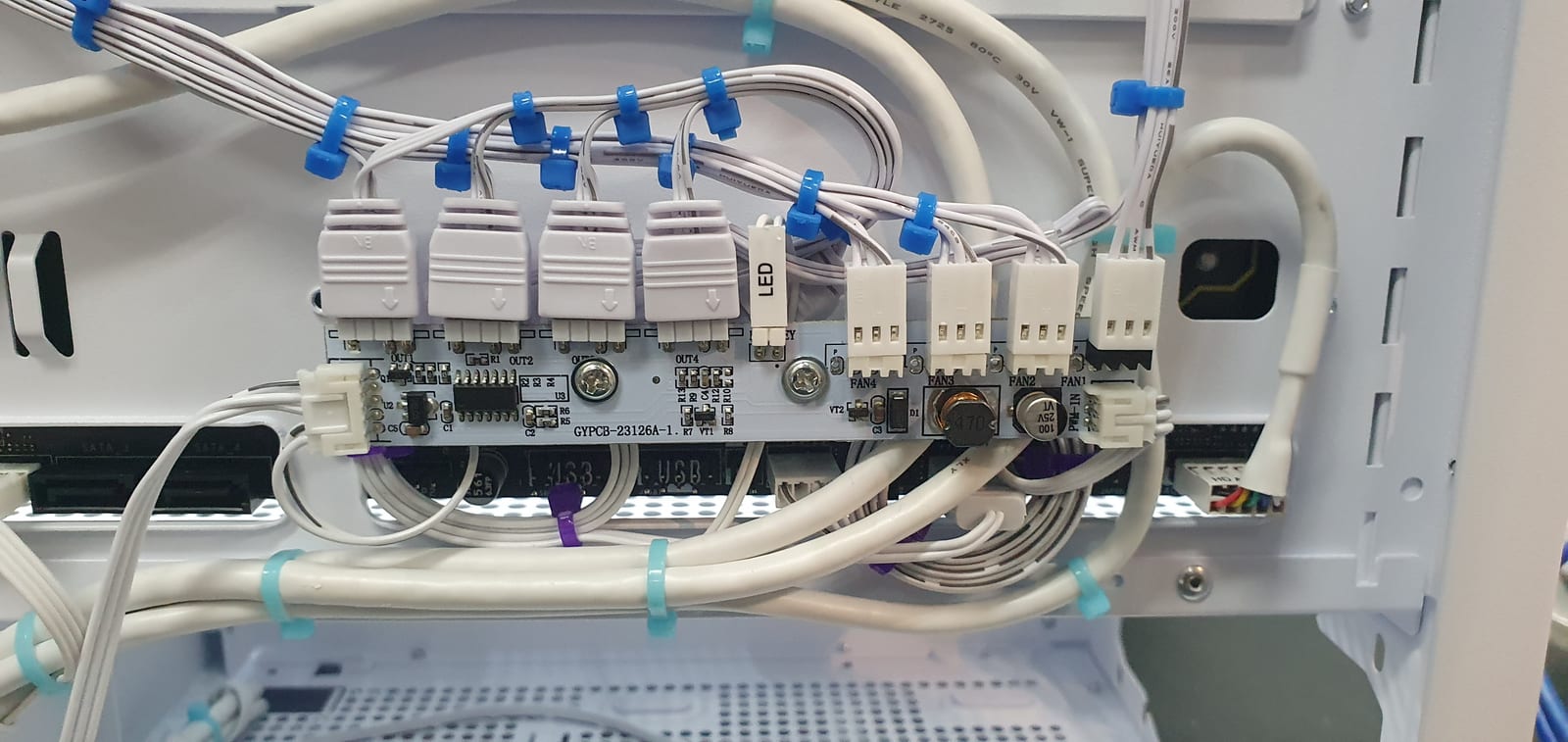
Behind the motherboard tray of a white PC case, where fan and lighting cables are routed to a hub and held with blue and turquoise clips grouped by functionAfter

Colour-coded cable paths

Cables are layered and routed, then zip-tied by colour — one colour per cable path and component group. Replace a power supply two years from now and you can see exactly which cables are its own and pull only those.

Every build starts as a tangle. Colour-coded routing is the difference between that and the tray on the right.

Power, ARGB, fan headers, front-panel and USB are never bundled together.

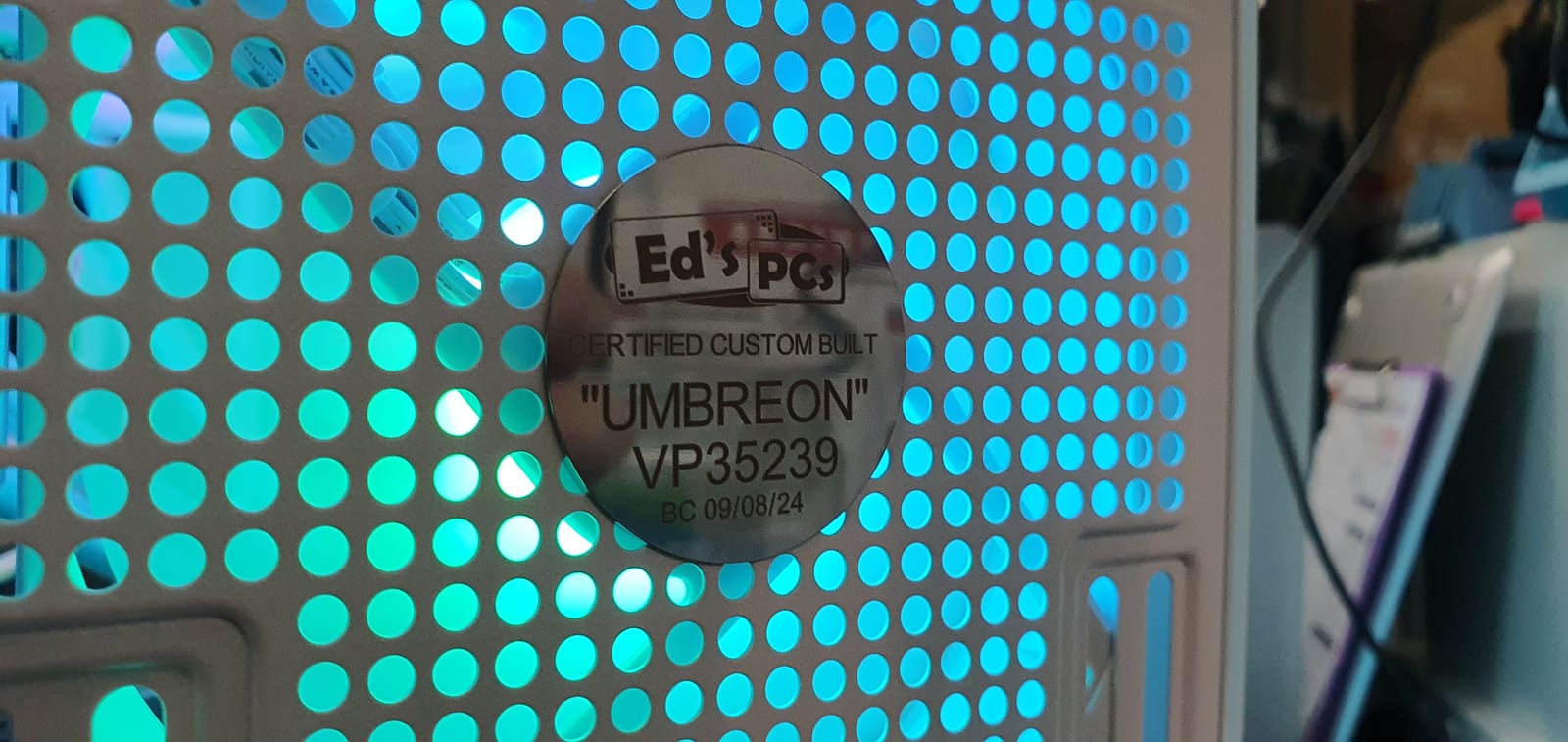
A round engraved metal plate reading Ed's PCs, Certified Custom Built, "UMBREON", fixed to a perforated case panel backlit in cyan

Laser-engraved plates

High-end builds get an engraved plate, cut on our own laser engraver in store. Not a sticker pretending to be one.

Every high-end build gets its own name and job number. This one is "Umbreon".

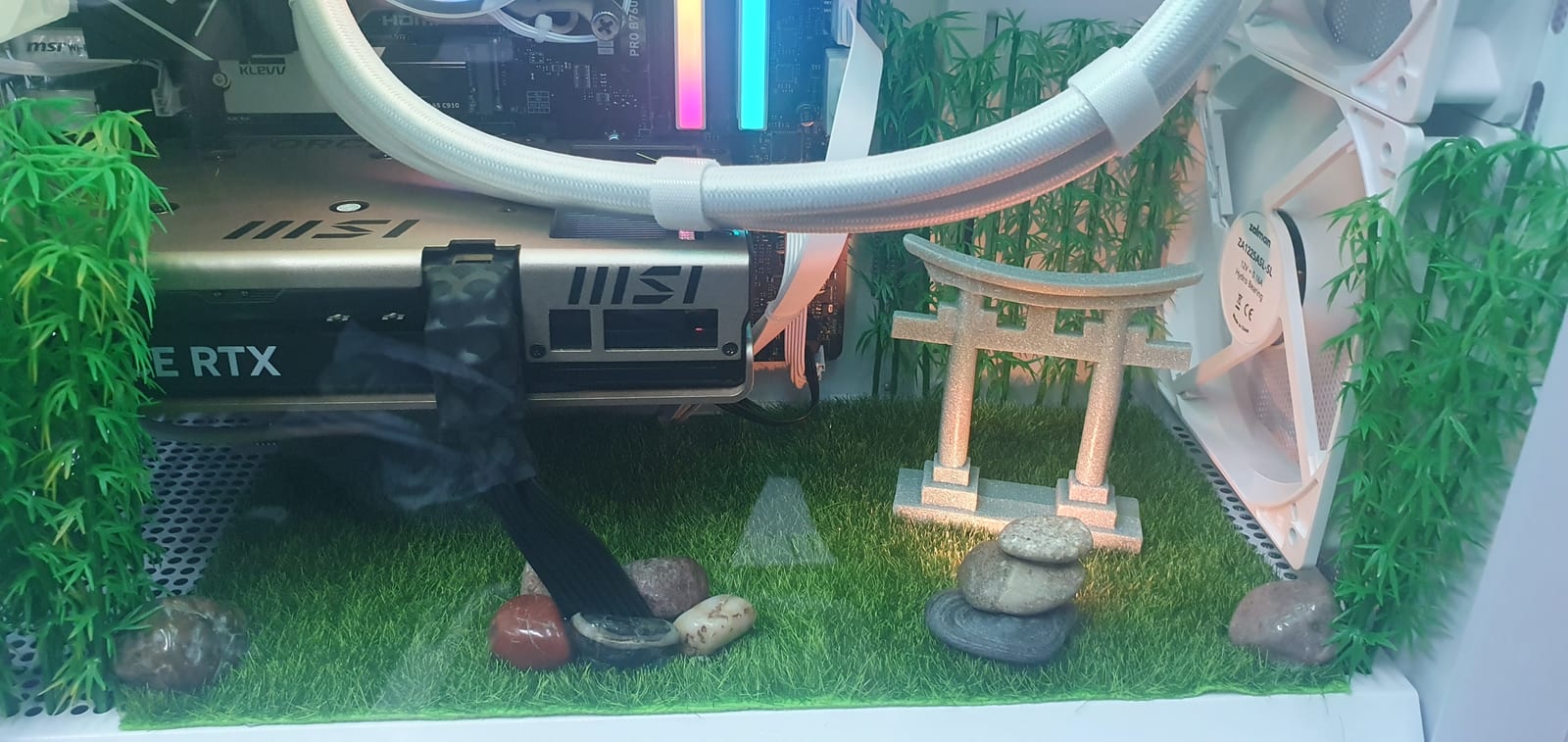
A miniature torii gate and stacked river stones on artificial turf, built into the floor of a PC case

Diorama builds

Themed scenes built into the case itself. Almost nobody else will take this on — it's slow, fiddly work, and it's some of the most fun we have.

From the "Zen" build — a Japanese garden on the floor of the case.

Labelled where it matters

Custom stickers marking the ports you should actually be plugging into, so the machine still works properly after it's been moved.

See the guide on why the monitor goes in the graphics card, not the motherboard.

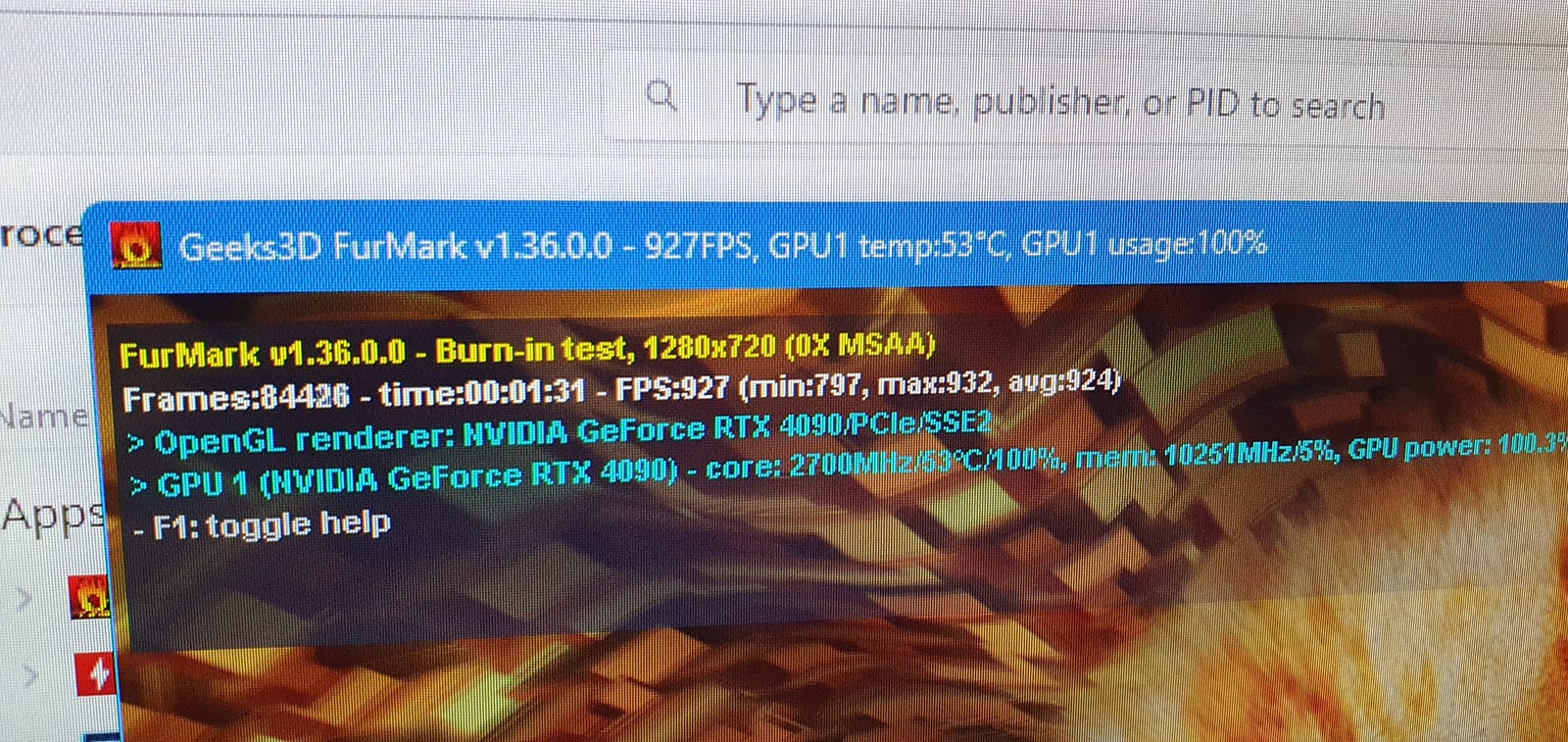
A FurMark burn-in test running on screen, reporting an NVIDIA GeForce RTX 4090 at 100% usage and 53 degrees

Tested under load

Every machine is run under sustained load before it leaves, not just powered on to see if it POSTs and then boxed.

A 4090 held at 100% and 53°C. If it's going to fall over, we'd rather it did it here.

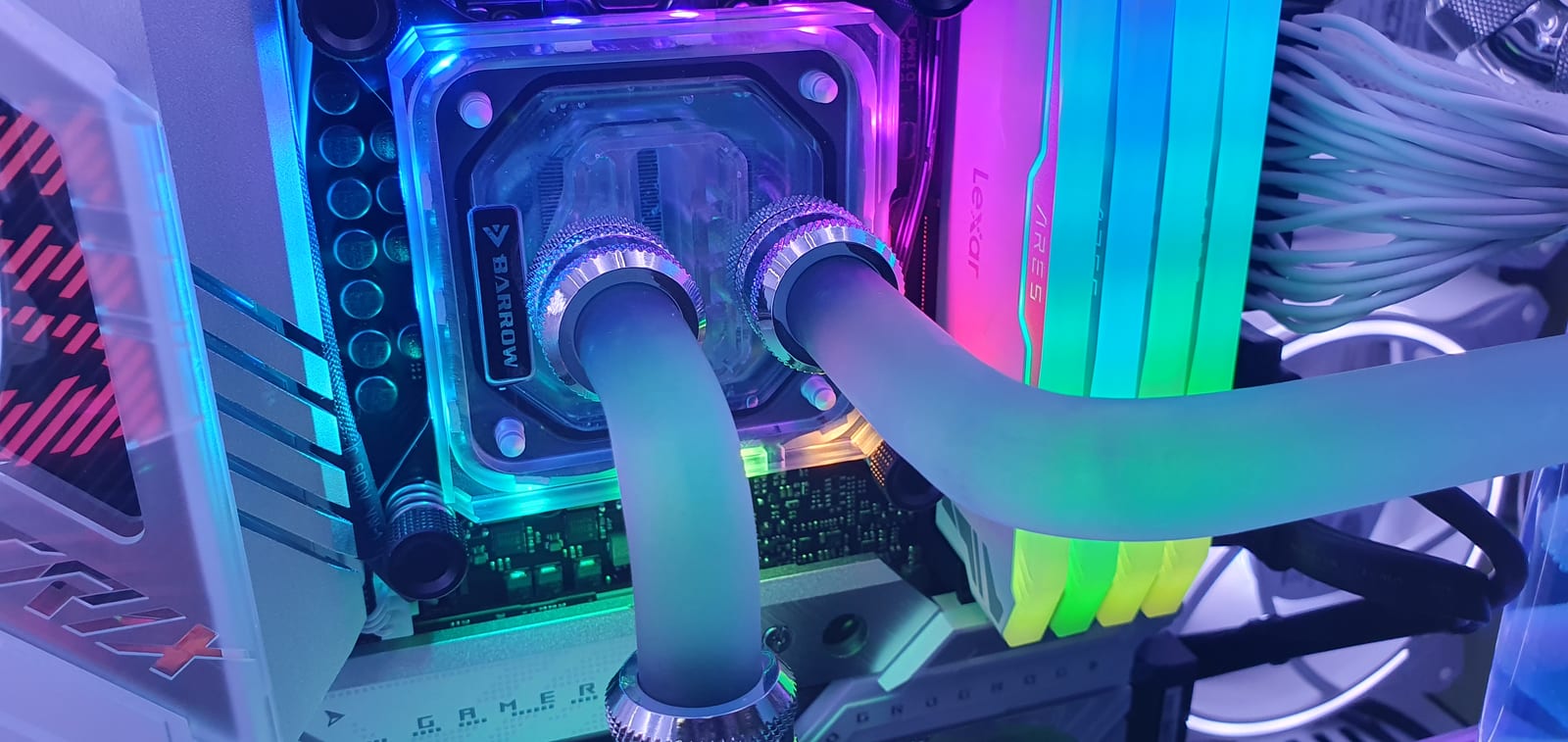
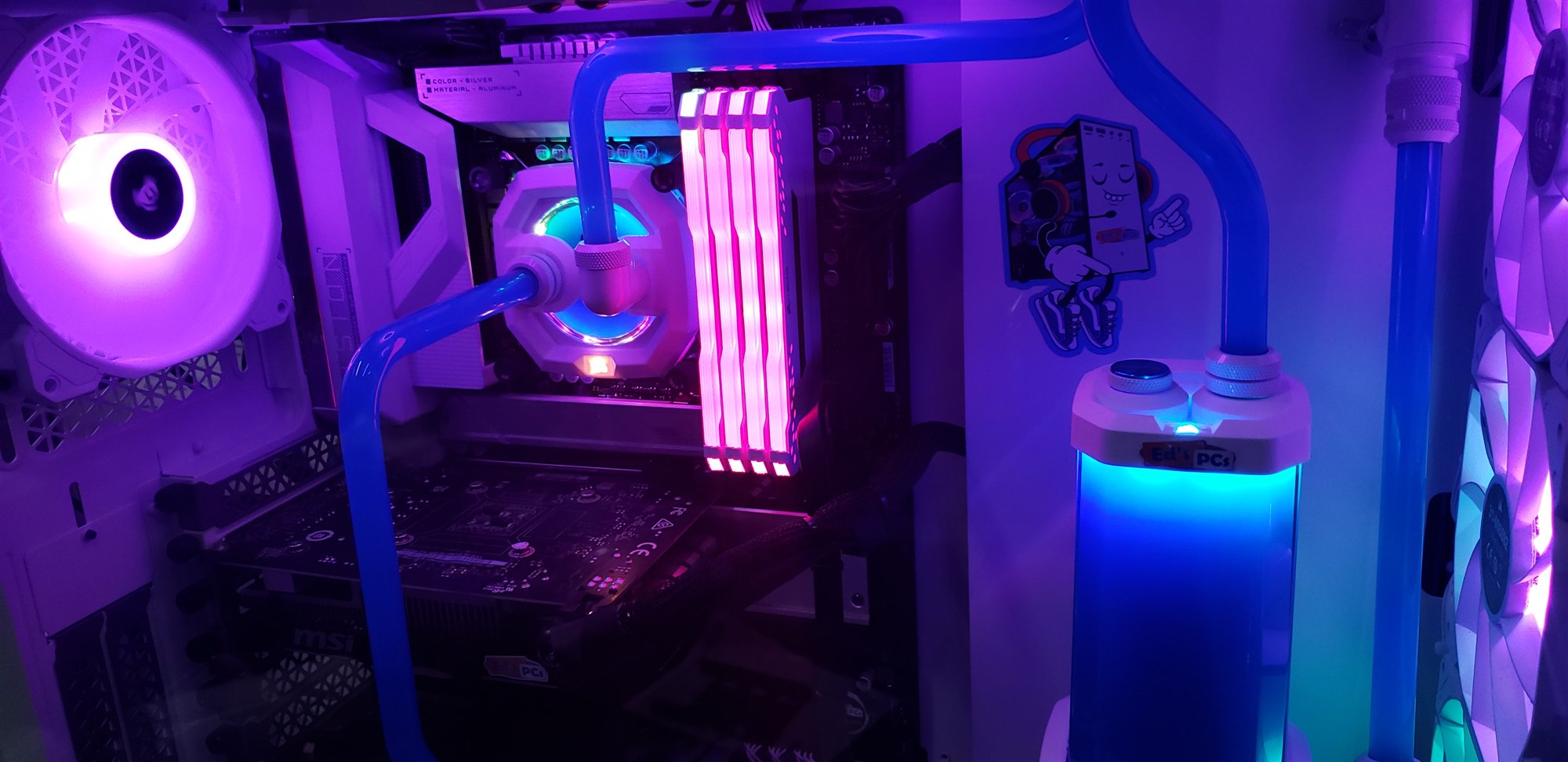
A CPU water block and RGB memory inside a white build, with an Ed's PCs sticker on the reservoir

Built by someone trained to

Either Brett or someone he's trained and signed off. Nobody builds a customer machine here until they've been taught the standard — which is why they all look the same regardless of who assembled it.

The standard doesn't move depending on who's on the bench.

Recent builds

The proof is easier to look at than to describe.

White hard-line water-cooled build

Custom hard-line loop, bent and fitted in house. Gigabyte Vision G, MSI graphics, Corsair case and radiator, colour-matched white throughout.

White custom gaming PC with hard-line teal water cooling loop, white Corsair fans and a lit reservoir
The full loop. Every run is bent to fit rather than routed with flexible tube.
CPU water block and RGB memory inside a white build, with an Ed's PCs sticker on the reservoir
CPU block and memory. Reservoir plate is ours.
Close view of the CPU block, RGB memory and white radiator fans lit in green and pink
Same machine under different lighting.
The complete white Corsair tower on the workshop bench, lit teal, with three RGB front fans and an Ed’s PCs badge on the front panel
Finished, on the bench. Badge on the front panel, plate on the reservoir.
The same white hard-line build lit blue and purple instead of teal, showing the full loop from the CPU block round to the reservoir
The same machine again, on a different lighting profile. The loop doesn’t change; everything around it does.

Specification

  • Gigabyte Z490 Vision G
  • MSI graphics card
  • Custom hard-line water cooling loop
  • Corsair case with top-mounted radiator
  • Colour-matched white fittings and fans

What went into it

  • Hard-line tubing bent and cut to fit — no soft tube shortcuts
  • Ed's PCs branded reservoir plate
  • Colour-matched white blocks, fittings and fans
  • Cable runs kept clear of the loop for serviceability

"Zen" — Japanese garden diorama

A miniature Japanese garden built into the floor of the case: turf, bamboo, a torii gate and stacked river stones, under a white-sleeved cooling loop.

A white PC case lit pink and purple, with a miniature Japanese garden of turf, bamboo and a torii gate built into the floor beneath the components
The whole scene, lit. The garden sits on the floor of the case, under the graphics card.
Close view of a miniature torii gate and stacked river stones on artificial turf inside a PC case, with white sleeved cooling tube above
Stacked stones and the torii gate. The stones are real, and each one was placed by hand.
The garden scene lit purple, with bamboo screening the rear fan and the engraved Ed’s PCs plate visible behind the torii gate
Bamboo screens the rear fan. The engraved plate behind it names the build.

Specification

  • MSI PRO B760 motherboard
  • GeForce RTX graphics
  • KLEVV RGB memory
  • White-sleeved 360mm liquid cooler

What went into it

  • Scene built into the case floor — turf, bamboo, torii gate, stacked stones
  • Cabling routed underneath and behind the scene so nothing crosses it
  • Colour-matched white fans, tubing and sleeving throughout
  • Engraved "ZEN" plate on the rear fan

"SSG Goku" — figure diorama build

A white showcase tower with a lit figure mounted in the lower chamber, an in-case sensor display, and a triple side radiator.

A white showcase PC tower lit purple, with three side-mounted RGB fans, a small display panel showing temperatures, and a lit figure standing in the lower chamber
Finished, on the bench. The display in the top corner is showing live temps under load.
Close view of a lit figure standing on an illuminated flame-effect base inside the lower chamber of a white PC case
The base is lit from inside and wired into the machine, not battery powered.
An engraved black Ed’s PCs plate reading CERTIFIED CUSTOM BUILT, "SSG GOKU", on the perforated rear panel of a white PC case
Every high-end build gets one of these, cut on our own laser engraver.

Specification

  • AMD Ryzen 9 (7000 series)
  • GeForce RTX Aero graphics
  • Corsair Vengeance RGB memory
  • Triple 120mm side radiator, white throughout

What went into it

  • Figure mounted on a lit base in the lower chamber, wired into the case lighting
  • In-case display showing live temperatures and load
  • Engraved plate on the rear panel naming the build and its job number

Two screens, a hard-piped graphics card, and a lot of chrome

The most involved machine we have built. A dual-chamber showcase case with a hard-line loop running through both the processor and the graphics card, a full-height display behind the front glass and a second sensor panel inside the chamber.

A white dual-chamber PC case on a workbench with a lit blue hard-line water cooling loop, distribution plate and a tall display panel behind the front glass
The whole machine. The tall panel on the left is a screen, not a printed side panel.
The interior of the build lit purple, showing hard-line tubing running between the processor block and the vertically mounted graphics card
Hard tube runs to the graphics card as well as the processor. That is the hard part.
Close view of a clear CPU water block with chrome compression fittings, lit white and blue, with white RGB memory alongside
Every run is bent and cut to fit. There are no flexible-tube shortcuts anywhere in this loop.
The same CPU block and memory lit in full rainbow RGB, showing the chrome fittings and hard tubing
Same machine, different lighting profile.
A close view of the in-case sensor panel showing processor load, clock speed, pump RPM, graphics temperature, storage, network and motherboard power draw, beside chrome fittings and a watch movement
The second display. Pump speed, temperatures, power draw — everything the machine is doing, without opening anything. The watch movement set into the fitting below it was the owner’s idea.
A vertical view into the case chamber showing the distribution plate, hard tubing and the sensor panel mounted above it
The lower chamber, with the distribution plate feeding the whole loop.
The finished build with the front screen showing a blue DNA helix animation
The front screen runs whatever you like — this is one of the built-in scenes.
The same build with the front screen showing green falling-code animation and the interior lit to match
Lighting follows the screen. Change one and the whole machine changes with it.
Close view of the clear CPU water block with chrome compression fittings and lit blue coolant
Chrome fittings, blue coolant, and not a cable in sight from the front.
The finished machine standing on the workshop bench among tools and parts
On the bench where it was built. Every machine on this page was assembled in the Victoria Point workshop.

Specification

  • Intel Core i9-12900K
  • GeForce RTX 4090
  • Custom hard-line loop, CPU and graphics card
  • Distribution plate instead of a tube reservoir
  • Two built-in displays

What went into it

  • The graphics card is hard-piped into the loop, not just the processor — a great deal harder, and the reason the front chamber looks the way it does
  • A full-height screen behind the front glass, running whatever the owner wants on it
  • A second panel inside the chamber reporting processor, graphics, storage and network live
  • Distribution plate rather than a tube reservoir — fewer runs, cleaner front chamber
  • Chrome compression fittings throughout, with a watch movement set into one of them
  • Colour-matched white blocks, fans and sleeving

Planted build in pink

A pink case filled with foliage and a winged display showing live system stats — proof that a diorama build does not need a flagship parts list.

A pink PC case with green foliage arranged around the motherboard and graphics card, and a round winged display showing processor and memory usage
The display is reporting the machine’s own processor and memory use, live.

What went into it

  • Foliage arranged around the components without blocking airflow paths
  • Winged stat display mounted at the front, reporting processor and memory use
  • Colour-matched pink case and lighting

White-on-black sleeved build

A white case behind smoked glass, with every power cable individually sleeved in white and looped rather than bundled — the tidy build, done without a custom loop.

A white PC case with smoked glass, lit pink and purple, showing a Corsair liquid cooler, RGB memory and looped white sleeved power cables
The reason for the sleeving: it is the first thing you see through the glass, so it gets treated as a visible part.
The same white case from the front corner, with two large RGB intake fans lit in pink and orange behind the smoked front panel
Front intake pair, lit to match the rest of the machine.

Specification

  • ASUS ROG motherboard
  • MSI GeForce RTX graphics
  • Corsair liquid cooler with white sleeved tubing
  • RGB memory across all four slots
  • Corsair RGB fans, front intake and rear exhaust

What went into it

  • Individually sleeved white power cables, looped and dressed rather than cable-tied out of sight
  • White components chosen to read against the smoked glass instead of disappearing into it
  • Lighting matched across cooler, memory, graphics card and every fan

Gunmetal showcase build

The dark counterpart to the white builds — a gunmetal Cooler Master case with a triple-fan Aorus card, lit rather than colour-matched.

A gunmetal Cooler Master PC case shot from the front corner, with a triple-fan AORUS graphics card and a Cooler Master liquid cooler lit blue and purple behind the glass, and green-lit fans in the front column
Not every build is white. The same standards apply — they are just harder to photograph.

Specification

  • Cooler Master case with mesh side column
  • Cooler Master liquid cooler
  • AORUS triple-fan graphics card
  • RGB front fans

What went into it

  • Cabling routed behind the tray and out of the window entirely, which a dark build shows up faster than a light one
  • Graphics card braced against sag
  • Lighting kept to the front column and the components, so the case itself stays dark

The build with the holographic display

A showcase build with a genuine holographic fan mounted inside the case — a spinning LED blade that draws a floating 3D image in mid-air, not a screen or a projection.

This is not a screen or a video overlay. The fan blade itself is drawing the image — the same trick a persistence-of-vision poi toy uses, built into a PC.

Specification

  • Gigabyte graphics card and motherboard
  • MSI-branded pump/AIO with an on-cooler readout
  • RGB memory
  • Persistence-of-vision holographic fan display

What went into it

  • A real holographic fan — the spinning blade itself draws the image, using the same trick as a persistence-of-vision poi toy, not a hidden screen
  • Several animations cycle through it — a firework burst, a bottle with sparkles, a lightning bolt
  • Case chosen specifically to show the effect off through the front glass

"Rick and Morty" portal build

A themed build with a glowing portal ring and a Rick figure mounted inside the case, on a case printed with the Rick and Morty logo.

The portal ring cycles colour on its own. Themed builds like this one are exactly the kind of job most shops won't take on.

Specification

  • ASUS graphics card
  • RGB memory
  • CV750 case with printed Rick and Morty branding

What went into it

  • A lit portal-ring prop mounted inside the case, colour-cycling like the show's effect
  • Rick figure mounted beside it, wired into the case lighting rather than sitting loose
  • Branding printed on the case itself, not a sticker

Planted build with a holographic display

A second holographic-fan showcase, this one planted with moss and foliage rather than built into a garden scene. The animation cycles on its own — a leopard, a flower, a hummingbird all turned up in the same shoot.

The "Zen" build on this page is not a one-off, and neither is the holographic fan — this case cycled through a leopard, a flower and a hummingbird over one afternoon.
A white PC case planted with moss and ivy, showing a holographic display of a walking leopard among the foliage, lit green
One of several animations the fan cycles through on its own.
The same case from a different angle, showing a holographic flower animation and an Ed's PCs branded plate mounted on the top panel
Same build, a different animation — and our own plate on the case rather than a sticker.
The rear of the case with cables routed and zip-tied by colour, matching the standard applied to every build
Behind the tray. The same colour-coded routing standard, on every machine, including this one.

Specification

  • Gigabyte graphics card
  • RGB memory
  • White case chosen to let the green lighting and foliage read clearly
  • Persistence-of-vision holographic fan, same as the other showcase build

What went into it

  • A real holographic fan mounted in the lower chamber, cycling through several animations rather than showing one fixed image
  • Foliage packed around the chamber without blocking airflow
  • Green lighting matched to the planting rather than a generic RGB cycle
  • Finished with our own branded plate on the case, not a sticker

More going up as we photograph them properly.

Why we're like this about it

Having a computer shop is the only thing I ever wanted to do. That's not a marketing line — it's why the cable routing gets the time it gets, and why nobody here builds a customer machine until they've been trained properly and signed off.

You can buy a cheaper machine online. You'll also get one that was assembled by someone paid per unit, with every cable bundled into one bunch behind the motherboard tray, and no way to service it without starting from scratch.

— Brett, Ed's PCs Victoria Point

Thinking about a build?

Tell us what you play and what you've got to spend. We'll tell you honestly where the money is best going — including when an upgrade beats a new machine.